The question I'd never actually tested
I run my whole life on a structured vault plus Claude. Tens of thousands of markdown files, a calendar spine, a four-level folder structure per domain, typed frontmatter on everything. And, on a lot of files, tags — tags: [career, positioning, validation, ...] — dutifully added, because that's what you do.
The belief underneath the habit was simple: tags help the AI find things faster. More handles, better retrieval. It felt obviously true.
Then a nagging thought: I'd never checked. So I did — I ran the numbers across the vault. The answer surprised me enough to write it down, because it turns out the question splits cleanly in two, and the two halves have opposite answers.
Two questions wearing one coat
"Do tags help?" is really two questions:
1. Do tags help the humans and the sites? — readers browsing, search engines indexing, related-post widgets on a published blog. 2. Do tags help Claude operate? — the AI finding, retrieving, and reasoning over my documents when it does actual work for me.
For question 1 the answer is a clear yes, and I'm not going to belabour it. On a published site, a tag is a navigation surface and an SEO signal. WordPress, a blog theme, a reader clicking "more like this" — all of that genuinely runs on taxonomy. Tag your published articles. Done.
Question 2 is the interesting one. And here the honest answer, from my own data, is: mostly no — and understanding why changes how you should structure everything.
Why an AI doesn't read tags the way a notes app does
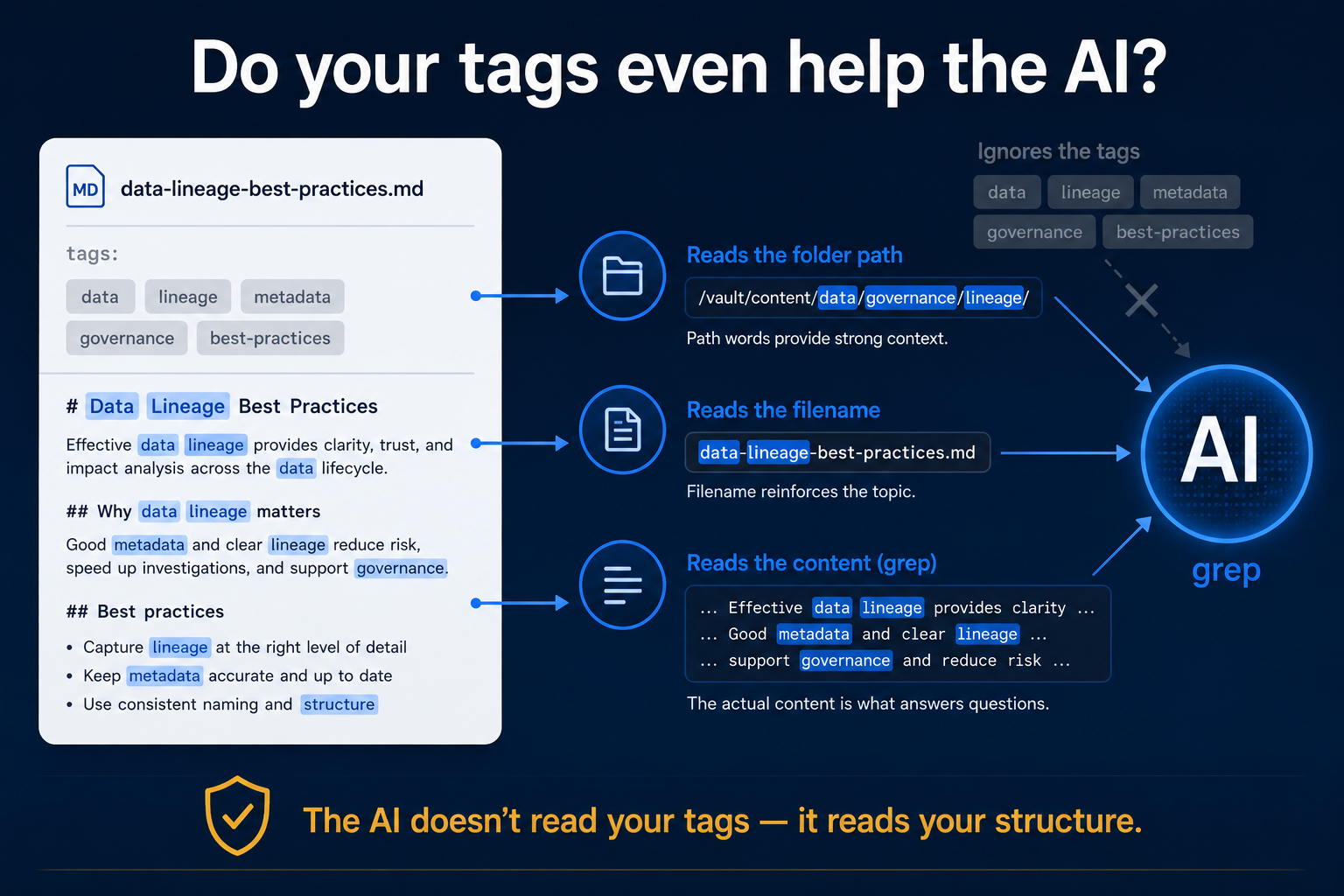
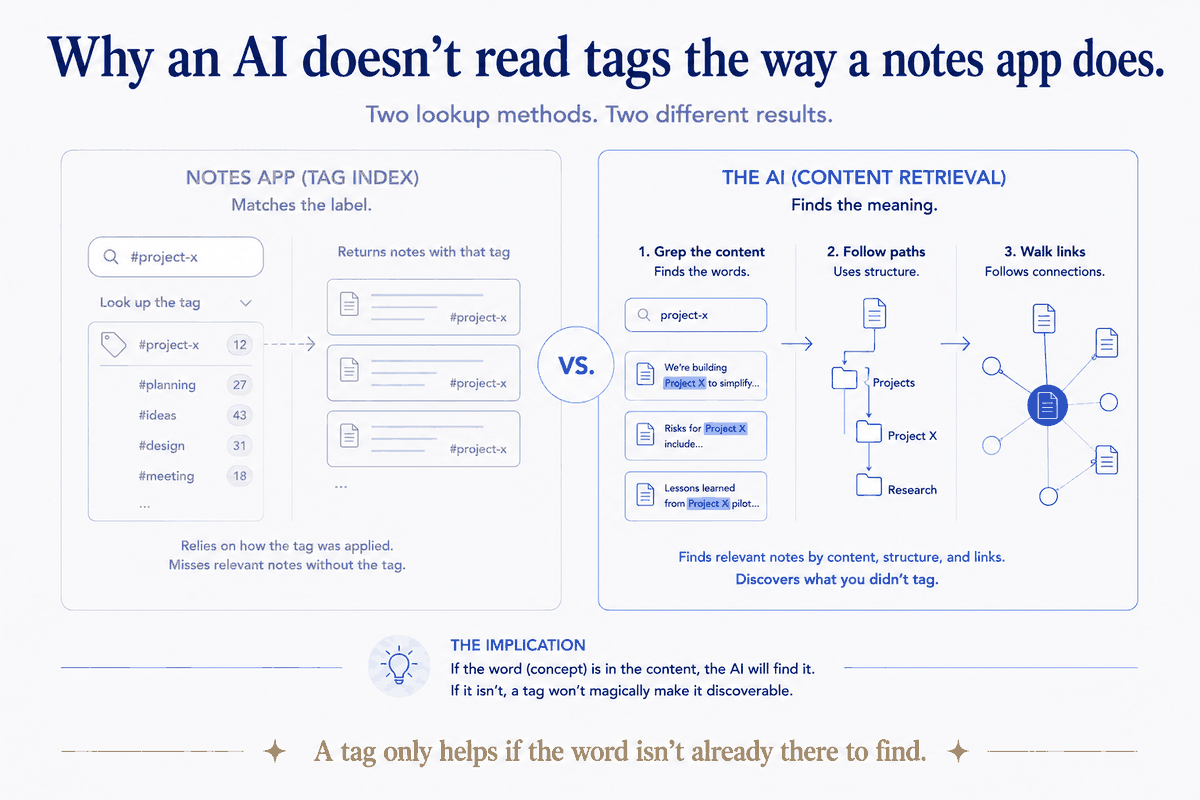
Here's the thing I'd glossed over for years. Claude doesn't have a tag index. When it looks for something in my vault, it doesn't run "give me everything tagged #validation." It does what a developer does at a terminal: it greps — searches file contents and paths — and it globs — matches folder and filename patterns.
That's the whole mechanism. And it has a consequence I should have seen immediately:
A tag only helps the AI if the tag word is not already somewhere greppable — the body, the filename, or the path.
Because if the word is already in the body, grep finds it with or without the tag line. The tag is just a duplicate copy of a word that's already there. It costs a line of frontmatter and buys nothing.
So I stopped theorising and checked whether my tags were actually adding new, findable words — or just echoing words already in the text.
What the vault actually showed
I looked at a real file, one of my positioning infographics. Its tags:
tags: [career, positioning, infographic, validation, business, demand, training-material]Seven tags. I checked each one against the filename and the body of that same file. Result:
| Tag | Already in filename? | Already in body? |
|---|---|---|
| career | — | ✅ (also in the folder path) |
| positioning | — | ✅ (also in the folder path) |
| infographic | — | ✅ (also the folder it's in) |
| validation | — | ✅ |
| business | ✅ | ✅ |
| demand | — | ✅ |
| training-material | — | ✅ |
Seven out of seven were already in the body. Two of them were also in the folder path. Grep would surface that file for every single one of those words without the tags line existing at all. The tags weren't a retrieval handle. They were a second, redundant copy of words the file already contained.
That wasn't a cherry-picked file. Across the tagged files I sampled, 80–90% of tag keywords were already present in the body, the filename, or the path. The tags were echoing the content, not extending it.
And the structure was doing the heavy lifting I'd credited to tags. That file lives at:
career / 2-active / positioning / infographics / 2026-07-04_validate-your-business-idea.mdRead that path. It already says: a career document, currently active, about positioning, in infographic form, dated, about validating a business idea. Before a single tag. The path is a sentence, and the AI reads paths.
The tell: where I didn't use tags at all
The most convincing evidence wasn't in the tagged files. It was in the ones without tags.
My decision records — the documents I most need to retrieve precisely — carry no tags. A file like assets/car/1-plan/6-decisions/PDR-051-vehicle-strategy-hybrid-vs-ev.md has none. It doesn't need them: the path says the domain and that it's a decision, the type: PDR field makes it queryable, the id: PDR-051 makes it addressable, and the slug says what it's about. Structure and typed fields carry the whole load.
And my cross-session memory — the AI's long-term recall, the thing whose retrieval matters most — doesn't use tags either. It uses a typed field: type: user | feedback | project | reference. Not a free-text keyword list. A small, fixed vocabulary the system can reason over. When I actually designed for retrieval, I reached for typed structure, not tags. I'd been doing the right thing in the places that mattered and cargo-culting tags in the places that didn't.
Tags vs structure: the real distinction
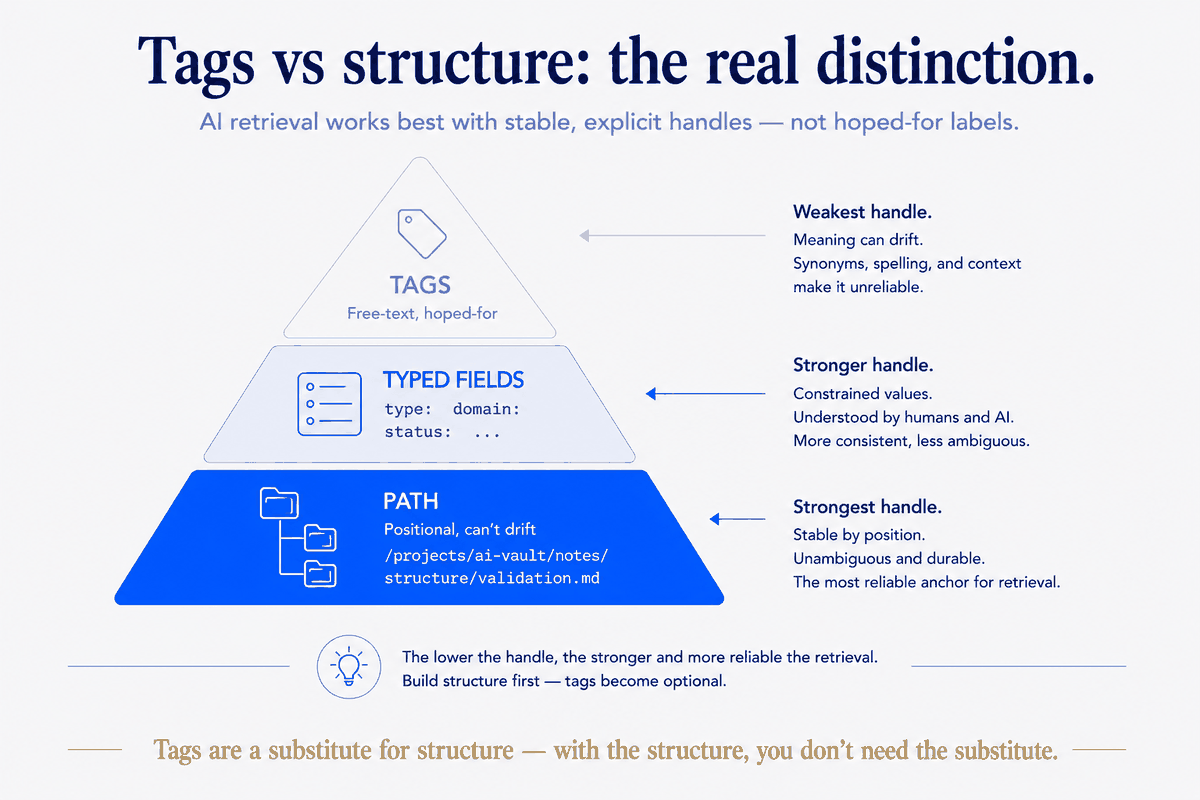
This is the crux, and it's the same lesson that runs through everything I build:
- A tag is an untyped, free-text keyword you have to remember to add, keep consistent, and match by synonym later.
training-materialin the tag; "training" in the body; same idea, different string — and now retrieval depends on you having guessed the right word twice. - Structure — the folder path, the four-level lifecycle (
1-plan/2-active/3-history/4-insights), the calendar spine, atype:enum, adomain:field — is positional and typed. It can't drift out of sync with itself, because it is the file's location and shape. It's there whether or not you remembered to think about retrieval.
Tags sit on top and hope you were disciplined. Structure is underneath and doesn't need you to be.
That's not an anti-tag argument. It's a hierarchy: path first, typed fields second, and tags only for the thin slice of cases neither covers.
When a tag genuinely earns its place
I went looking for cases where a tag would actually help the AI — where structure honestly can't reach. There are a few, and they're worth naming, because "mostly no" isn't "never":
1. A true synonym or a second language. My vault is bilingual — "Car" / "Auto" / "Mobility." Grep for one misses the others. But the right tool here is an aliases: field (a typed synonym list), not a general tag pile. Same instinct, sharper instrument. 2. A cross-cutting theme with no shared word. "Everything about my sabbatical" is scattered across career, finances, travel, and health, and those files don't all contain the word "sabbatical." A tag could unify them. But I found I'd solved it structurally instead — a subject: sabbatical field, queryable across domains — which is, again, a typed handle rather than a free tag. 3. A topic the document never states about itself. Rare, but real: when a file's subject genuinely isn't in its own text, a tag adds a word grep couldn't otherwise find. This is the one clean win. It's also uncommon — most documents say what they're about.
Notice the pattern: every genuine win is either better served by a typed field, or it's the narrow case where the tag adds a word that truly isn't anywhere else. That's a small set. It's not the reflexive seven-tags-per-file habit I'd built.
The same lesson, in the data warehouse
If this sounds familiar to the data people: it's the metadata-vs-tags argument you already know. A dimension you can query — a typed column, a governed attribute — beats a free-text label smeared across rows. You don't tag your fact table #revenue; you model revenue as a structured, typed thing you can join and aggregate. Ad-hoc keywords are how meaning quietly drifts until two reports disagree. The vault version and the warehouse version are the same principle: typed structure you can query beats untyped keywords you have to match.
What I changed
I didn't rip every tag out — that's busywork, and on published articles the tags earn their keep for readers and SEO. But I stopped adding tags to working documents as a retrieval strategy, because for the AI they were paying rent for nothing. Instead I put the effort one level down:
- Make the path a sentence. If the folder structure and filename describe the document, the AI already knows what it is.
- Prefer a typed field to a tag.
type:,domain:,subject:,status:,aliases:— a small fixed vocabulary beats an open keyword list every time. - Reserve tags for the two jobs they're actually good at: reader-facing navigation on published sites, and the rare document whose topic genuinely isn't in its own text.
The honest limit
One caveat, because I'd rather be right than tidy. This is measured on my vault — one built structure-first, where the paths really are sentences and the frontmatter really is typed. If your notes live in one flat folder with generic filenames (note-2024-final-v3.md), tags carry far more weight, because you've given the AI nothing else to grep. The finding isn't "tags are useless." It's the sharper, more useful thing: tags are a substitute for structure — and if you have the structure, you don't need the substitute.