Thousands of photos, almost none of them memories
Look at your photo library honestly. It's tens of thousands of images — mine is well past eighty thousand — and the overwhelming majority have been viewed exactly once, at the moment they were taken, and never again. They're stored, meticulously, by date and occasionally by album. But storage isn't memory.
The problem is that a photo library is built for finding, and finding only works when you already know what you're looking for. Search by date requires you to remember when. Albums require you to curate — to sit down and sort, which you will not do, because nobody does. The closest anyone's come to solving this is the "On This Day" surfacing that Apple and Google do — genuinely the right instinct — but it's trapped inside their apps, in their framing, disconnected from everything else you know about that day. The photo of a dinner surfaces with no idea that your notes remember who was there and what you decided.
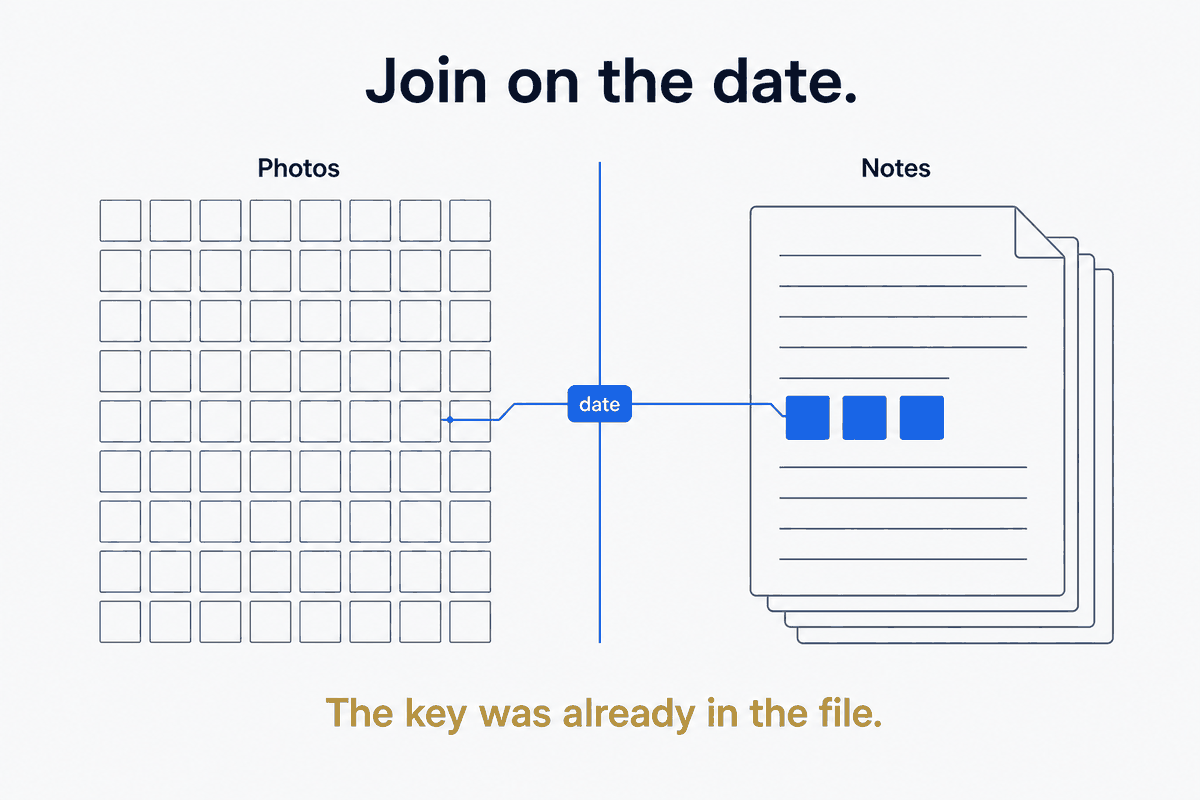
That last sentence is the whole opportunity. Your photos know when and where. Your notes know what it meant. They are two halves of one memory, filed in two systems that never talk. The unlock is to make them talk — and they already share the key they need to.
The DAM ↔ PKM split, and the join hiding in plain sight
Two systems, two jobs. Your DAM — Digital Asset Management, whatever holds your photos — is the canonical store: the files themselves, their EXIF metadata, your ratings, face-tags, locations. Your PKM — daily-notes, calendar, the whole written record — is the contextual store: what was happening, who was there, what you were thinking, what you decided. Neither is wrong; they're built for different things, and both are good at their own job.
The value isn't in either system. It's in the join — and the join key is one you already have and never think about: the date. Every photo carries the moment it was taken, right there in its EXIF, no tagging required. Every daily-note is, by definition, about a date. That shared key is a free foreign key sitting in eighty thousand files, waiting for a JOIN. You don't need to organize your photos to make this work. You need to use the organization physics already put in them.
The architecture: canonical store, queryable overlay, contextual surface
The shape that makes the join real has three parts, and it's the same shape that shows up all over a well-built personal system.
The photos stay canonical in the DAM — for me, a local Immich instance on the laptop, with a workstation holding a silent backup. Nothing about the join moves or mutates the originals; the library remains the single source of truth for the images themselves.
Over that sits a queryable overlay — a small DuckDB database, photos.duckdb, with one row per photo carrying the fields the join needs: the EXIF date taken, the rating, the location, the face-tags. This is the crucial architectural move, and it's a principle worth stating on its own: the database is a view, not the master. The files stay canonical; the DuckDB table is a rebuildable projection of them that exists purely to be queried. Lose it and you regenerate it from the photos; it never holds anything the photos don't.
And the contextual surface is the daily-note, which grows a ## Photos section. When the note for a day is enriched, it queries the overlay for that day's favorites — the photos rated four or five — and renders them as thumbnails right there in the note. Not all four hundred photos from a trip day. The handful you already told the system mattered, by rating them once.
The bridge, and why rating beats tagging
Mechanically the bridge is almost embarrassingly simple, which is the point. The daily-note enrichment runs a query — give me the favorite photos where the date taken equals this day — and renders the results as embedded thumbnails (or plain links, in a reader that isn't Obsidian). Roll that up the calendar and you get "favorite photos of this week," "of this month," "of this quarter," for free, because the same date key aggregates.
The thing that makes this cheap enough to actually sustain is a small behavioral insight: rating once is worth tagging a hundred times. Tagging is a per-photo chore you won't keep up — it demands you decide what every photo is about. Rating is a single gesture — good / not-good — that you'll actually make, in the flow of glancing through a day's shots. And a rating plus a date is all the join needs. You never tag "this is the Sicily trip"; the EXIF already knows it was Sicily-in-May, and your one-tap four-star already said it mattered. The metadata you've been ignoring does the work, and the one bit of judgment you will supply is the cheapest possible one.
The hardest part is the one nobody mentions: escaping proprietary metadata
Here's the honest complication, because the smooth version above skips a year of unglamorous work. I didn't start on an open stack — I started on Eagle, a DAM with proprietary metadata. My ratings, tags, and colour-labels lived in its database, in its format, going nowhere.
Escaping that was the genuinely hard part, and it's the part that generalizes as a warning: the value you build inside a proprietary tool is hostage to that tool. The migration meant extracting every rating, tag, and colour-label into XMP sidecars — the open standard that travels with the file and is read by Immich, digiKam, Lightroom, and anything else that respects it. That's what freed the metadata from any single app. And it was worth doing a full year of cleanup before migrating, not after, because migrating a mess just gives you a portable mess. The lesson costs a year to learn the hard way and one sentence to borrow: keep the metadata that represents your judgment in an open format that outlives the tool you happened to start in.
Encrypt by threat, not by reflex
A quick, load-bearing aside on protection, because "encrypt everything" is a reflex that wastes effort. Match the tool to the threat. The photo files are already encrypted at rest by full-disk encryption on the machines that hold them — so wrapping them in a second encryption layer for the local canonical copy protects against no additional threat and just adds friction. The daily-notes that mention genuinely sensitive context, though, go into a client-encrypted off-site backup, because those have a threat model — a stolen laptop, a cloud copy — that disk encryption alone doesn't cover. Don't double-encrypt; encrypt where a specific threat lives. Every layer should answer "protects against what?" — and if it can't, it's cost without cover.
What the join actually gives you
When the two systems finally share their date key, ordinary things become possible that weren't:
Year-in-review nearly writes itself — top-rated photos plus monthly aggregates are a query, not an afternoon of scrolling. Trip-debriefs arrive with their photos already attached — the debrief you write in a day-folder finds that day's favorites waiting in the note. And "what did I actually do last May 27?" becomes a one-click answer instead of an archaeology project, because the note for that day now holds both the words you wrote and the images you kept.
There's a further phase I'll be honest is designed but not yet built: clustering photos by location and time to seed an AI-drafted trip-narrative — feeding a day's cluster to a model and getting a first-draft journal entry back, at a cost cheap enough (on the order of thirty dollars) to backfill years of trip-days. It's promising and it's premature to claim as done, so I'm flagging it as the horizon, not the deliverable. The join is the deliverable. The narrative generation is what the join makes possible next.
Let your photo library become a journal
A photo library organized only for finding is a warehouse — vast, complete, and almost never revisited. The fix isn't to finally sit down and curate eighty thousand images; you won't, and you shouldn't have to. The fix is structural: recognize that your photos and your notes already share a key, build a thin queryable overlay that joins them on it, and let each day's favorites flow into the note for that day.
This is structure beats magic pointed at memory itself. The magic answer is a smarter photos app that surfaces the right image at the right moment inside its own walls. The structural answer reaches across the walls: keep the photos canonical, keep the notes contextual, join them on the date that was free all along — and watch the daily-note quietly turn from a record of what you thought into a page of what you also saw. Your photo library wants to be a journal. Give it the join, and let it.
Part of the Structure Beats Magic series. The favorites land in the day's day-folder; the DuckDB-as-rebuildable-view principle is Your Database Is a View. The photos themselves are backed up on their own stack — see the personal-backup piece — deliberately kept out of the document backup.