The tool everyone underuses
Syncthing is a peer-to-peer file-sync tool: no cloud server in the middle, encrypted in transit, mirroring directories directly between your own devices. Most people install it to solve one narrow problem — get photos off the phone, say — get that working, and never touch it again. They've seen a fraction of what it does.
Its real value shows up when you stop thinking of it as a way to move one folder and start thinking of it as the glue layer for personal infrastructure: the thing that connects your phone, your laptop, your tablet, and a family member's machine into one small mesh, each connection carrying a different flow with a different direction and a different trust level. Three of those flows cover most of a well-run personal setup, and the interesting thing is that they're all the same tool configured three ways — the configuration is the design.
Before that, one boundary worth drawing clearly, because it's where people misuse it: Syncthing is a mirror, not a backup and not a file-server. A backup keeps history so you can go back in time — that's Restic's job, and if a file gets corrupted, Syncthing will faithfully mirror the corruption everywhere. A file-server gives you remote access and permissions — that's Nextcloud's job. Syncthing keeps N copies of a directory identical, now, across devices you control. Ask it to be a backup and it will lose you data with perfect fidelity. Use it for what it is and it's superb.
The three flows, as three trust configurations
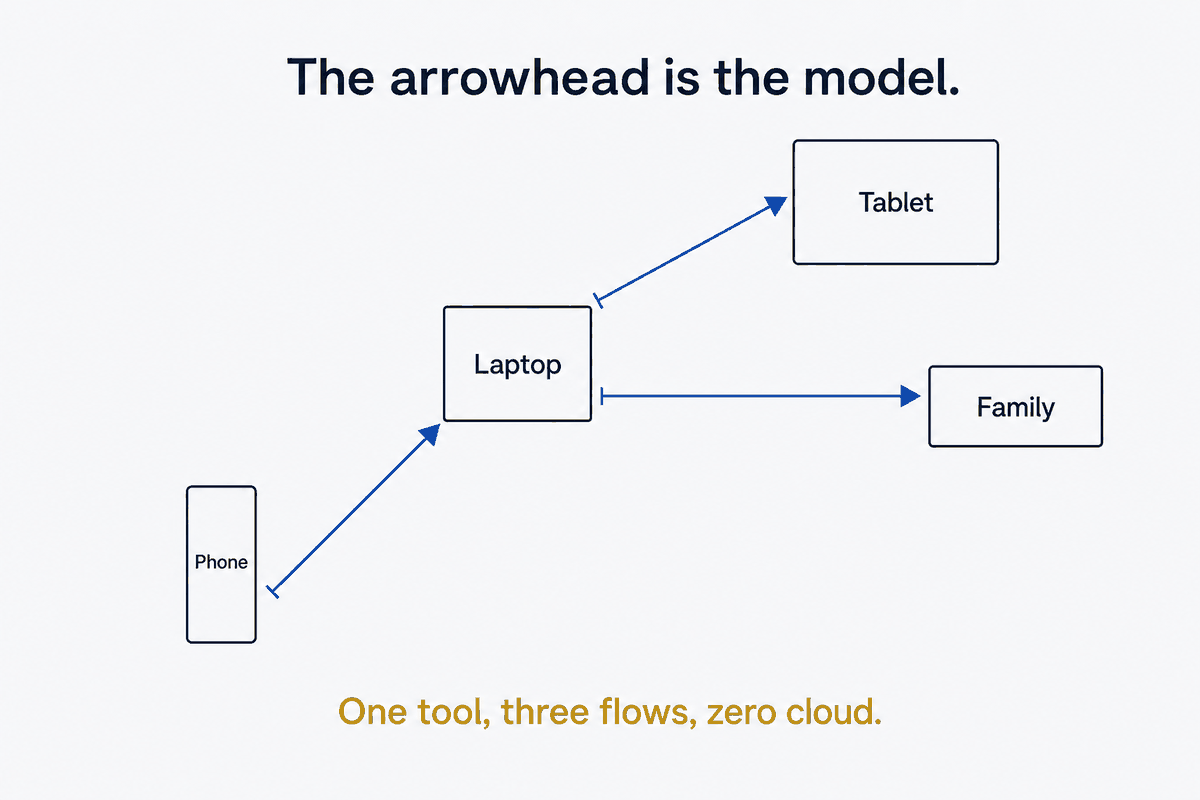
Here are the three flows I run, and the point is less the flows themselves than that each one is a direction and a trust decision made concrete:
Photos in. The phone's camera roll flows up to the laptop, landing in an inbox folder where a routing script can pick them up. The laptop is receive-only here — it takes what the phone sends and never pushes back. The phone owns this flow; the laptop is a sink.
Vault views out. A published view of my knowledge vault flows down from the laptop to the phone and tablet. The mobiles are receive-only — they display the vault but can't modify the source. The laptop owns this flow; the mobiles are consumers. (What gets filtered into that view is the master-vs-publish-vault question; Syncthing just carries the result.)
A folder shared out. A slice of family-context content flows one way to a family member's laptop. Their side is receive-only — they can read it, they can't corrupt it, and nothing they do propagates back to me.
Three flows, three directions, three trust levels — and every one of them is enforced by a single choice you make per folder. That choice is the whole security model.
Folder-type is the security boundary
This is the sentence to take away: folder-type is the security boundary, not user-permissions.
Most people reach for permissions — accounts, roles, "can this user edit." Syncthing gives you something blunter and, for personal infrastructure, better: it enforces direction at the protocol level, per folder, per device.
- Send-Only on a source means: this device pushes changes out and refuses to accept them in. Set your master side to send-only and it becomes structurally untouchable from downstream. Nothing a remote device does can flow back and alter it.
- Receive-Only on a target means: this device accepts the source's version and any local modification gets reverted. Not "discouraged" — reverted. A receive-only copy cannot fork away from its source, because the protocol won't let it.
- Send-Receive is the only bidirectional type, and you use it deliberately and rarely — for a genuine two-way folder like a capture back-channel, where both ends legitimately write.
The reason this beats permissions for a personal setup is that it's not a policy someone has to honor — it's a property of the sync relationship. Your family member on a receive-only folder cannot accidentally corrupt your data, no matter what they do on their end, because their edits don't survive the next sync. You didn't trust them to be careful; you configured a boundary that doesn't require them to be. And Syncthing tells you it's holding — the "reduced by ignore patterns" and out-of-sync indicators are your live confirmation that the direction is being enforced.
The ignore-file is the other half of the value
Between folder-types and ignore-files, you've captured most of what makes Syncthing worth running. The .stignore file — a per-folder list of what not to sync — is what keeps a flow clean.
The patterns are unglamorous and essential. On Android, exclude the junk the OS scatters through your storage: soft-deleted files (.trashed-*), pending downloads (.pending-*), the .nomedia markers. Everywhere, exclude OS metadata cruft — Thumbs.db, desktop.ini, .DS_Store, the ._* resource forks — because otherwise your clean vault view fills up with invisible garbage from three operating systems. Keep the ignore-lists folder-scoped, not global: each flow has different noise, and a per-folder .stignore is easier to reason about than one giant exclude file trying to cover every case.
The photo flow deserves special mention because it's the one that bites people. A phone's DCIM directory is not just your camera roll — it's screenshots, chat-app caches, downloaded memes, and soft-deleted images the OS hasn't purged yet. Sync it wholesale and you've mirrored a landfill to your laptop. Either filter hard at the source with .stignore, or let it land in an inbox and filter on the laptop side with a routing script. Raw DCIM is never what you want; the filtering is the work.
The gotchas nobody warns you about
Two categories reliably cost people an afternoon, so name them up front.
Android power management. Syncthing is a background service, and modern Android is aggressive about killing those. If your phone flow mysteriously stalls, the culprit is almost always battery optimization — the Syncthing app has to be set to unrestricted background activity or the OS suspends it. Wi-Fi power-saving compounds it, dropping the sync's TCP sockets mid-transfer. The reliable move for a big initial sync is boring: screen on, plugged in, and let it run. And read the status correctly — a large errors == needFiles count during a first sync isn't an error, it's just "still has files to fetch." It clears itself.
Device pairing. The pairing dance is a two-step exchange people rush and then debug. First, devices exchange IDs — scan a QR or copy the string. Then, for each folder, one side shares it and the other side must accept it. The "a device wants to share a folder with you" notification is flaky on some platforms; when it doesn't appear, don't assume pairing failed — open the Web UI directly and accept the folder there. The Web UI is the source of truth; the notifications are a convenience that sometimes lies.
What Syncthing deliberately doesn't do
An honest tool has honest gaps, and Syncthing's tell you what to pair it with.
It has no real conflict resolution — when two sides edit the same file, it doesn't merge or prompt; it just drops a .sync-conflict-* file next to the original and leaves you to sort it out. This is fine precisely because you've used folder-types to make most flows one-directional: a receive-only target can't create a conflict. It has no version history — it mirrors the present, so a deletion or a corruption propagates instantly with no undo, which is exactly why it sits alongside a real backup tool rather than replacing one. And it has no filtering intelligence — it moves whole folders as-is, which is why the interesting decision of what each audience sees happens upstream in a publish-engine, and Syncthing only carries the already-filtered result.
Those aren't failures. They're the shape of a tool that does one job — keep directories identical across your devices — and leaves the adjacent jobs to tools built for them.
One tool, well-bounded
The mistake with Syncthing is treating it as a solution to one problem. The move is treating it as the glue between problems: the transport layer that connects a routing script, a publish-engine, and a backup tool into something that behaves like personal infrastructure instead of a pile of manual copies.
This is structure beats magic at the infrastructure layer. The magic version is a cloud service that syncs everything and asks you to trust it with all of it. The structural version keeps the data on devices you own, and encodes the trust decisions as folder-types — send-only where the source must stay pristine, receive-only where a copy must never fork, send-receive only where two-way is truly meant. Get the folder-types and the ignore-files right and you've done eighty percent of the work. The rest is knowing what Syncthing isn't, and pairing it with the tools that are.
Part of the Structure Beats Magic series. What gets filtered into each synced view is Master vs Publish Vaults; the division of labor between Syncthing, Restic, and Git — mirror vs backup vs history — is its own piece.