Structure Beats Magic
The system, in practice

The System — how it actually works

Principles are nothing without the pieces that carry them. These are the building blocks I actually run — the spine that ties them together, the quality layer that keeps them honest, and the foundation that keeps them yours.

Start here

The components that make it work

Everything below is a piece I actually run. It starts with the spine that ties them all together — the daily note.

The spine

The daily note — your life, written by your data

One note per day, largely auto-filled from your own data — where you were, what you spent, what you captured, how you slept. Then it rolls up, automatically, from day to week to month to year. A living record you barely have to write.

DayWeekMonthQuarterYear
🏦 Bank transactions

A spending record is a life record — where you went, what you did, who you saw. One of the richest, most honest signals you own.

📄 Scans

Receipts and documents (e.g. via a scan app) quietly reconstruct what actually happened on a day — captured, not remembered.

📍 Location history

Your movements over years. With rules, raw coordinates become meaning: at work, at the gym, on a trip — context, automatically.

❤️ Health data

Steps, sleep, workouts from your phone (Health Connect) — the body's side of the story, folded into the same daily record.

✈️ Trips

Trip management reimagined — the useful idea behind apps like TripIt, rebuilt on your own data so you own it instead of renting it.

📸 Photos & more

Photos, mail, calendar, highlights — every source a thread; the daily note is where they're woven together.

Intentions vs. realization

Not just what you prefer — where you intend to go

Document your intentions with AI, and the system can reflect them back against what your data shows actually happened — direction versus reality, gently. Not a scorecard, not pass/fail — a mirror that helps you steer. Your modeled self holds taste and intent.
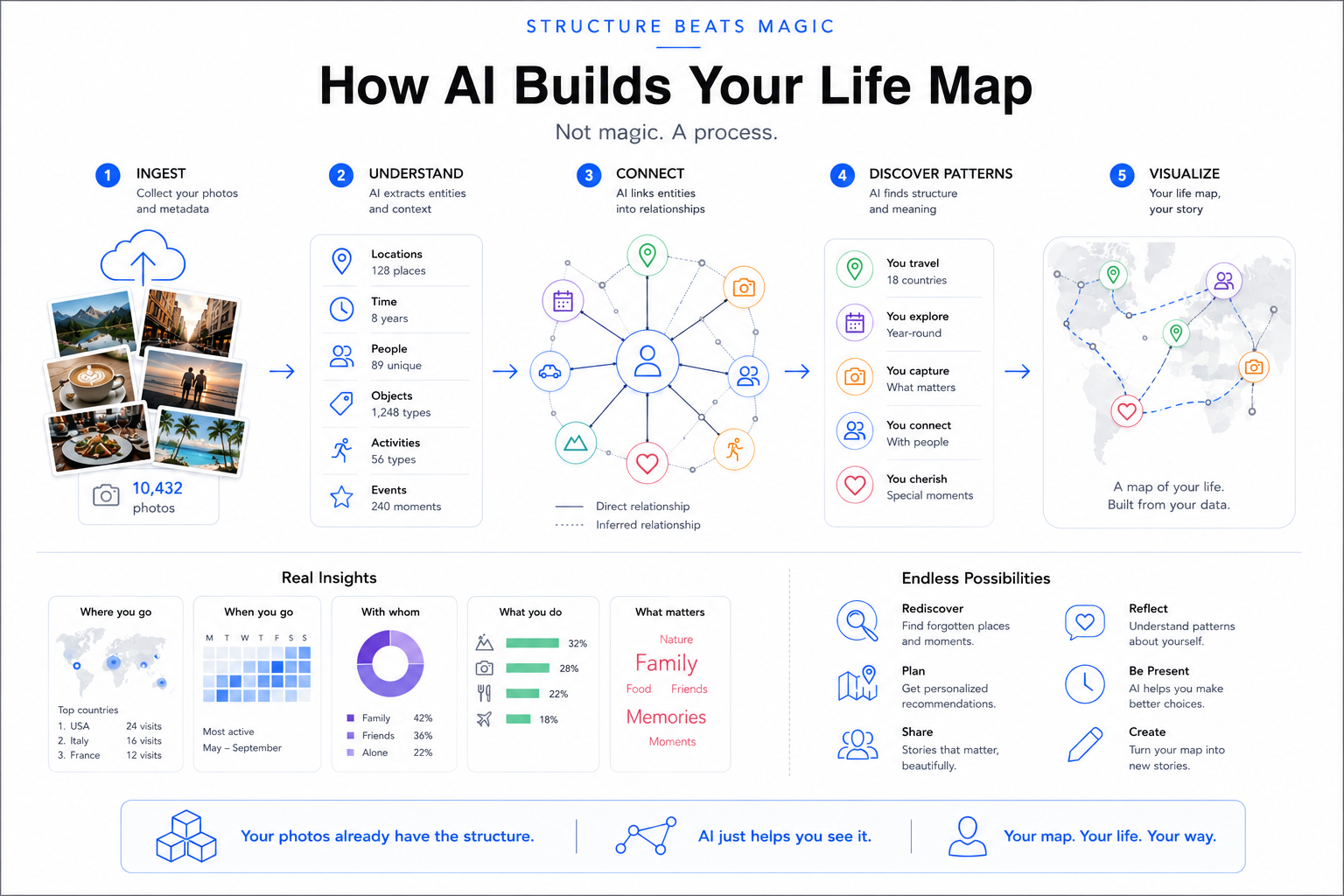
How AI builds your life map — ingest, understand, connect, discover patterns, visualize
Not magic, a process: ingest → understand → connect → discover patterns → visualise. The components above are the inputs; this is how they become a connected picture you can actually use.
How it's organised

The document vault

Underneath every intelligent system is a boring, beautiful thing: a well-structured document vault — plain files, in a deliberate shape, that both you and AI can navigate. Structure isn't bureaucracy; it's what makes the data findable, linkable, and trustworthy.

Calendar as the spine

Everything dated has a home

Time is the universal index. A calendar tree — year → quarter → month → week → day — gives every receipt, note, photo and event one obvious place to live, and a natural path to roll up.

calendar/
└─ 2026/ └─ Q2/ └─ 06 - Jun/
   └─ 2026-W26/ └─ 2026-06-29 Mon/
      # daily note = index of the day
      transaction_…  scan_…  debrief_…
Domains: personal · business · family

Ongoing state, split by life-area

What isn't tied to a date lives in a domain. Each follows the same four-level shape — so you always know where a thing goes.

personal/  # career, health, finances, travel…
business/  # the companies
family/    # shared
   ├─ 1-plan/      # thinking
   ├─ 2-active/    # current
   ├─ 3-history/   # archived
   └─ 4-insights/  # analysis
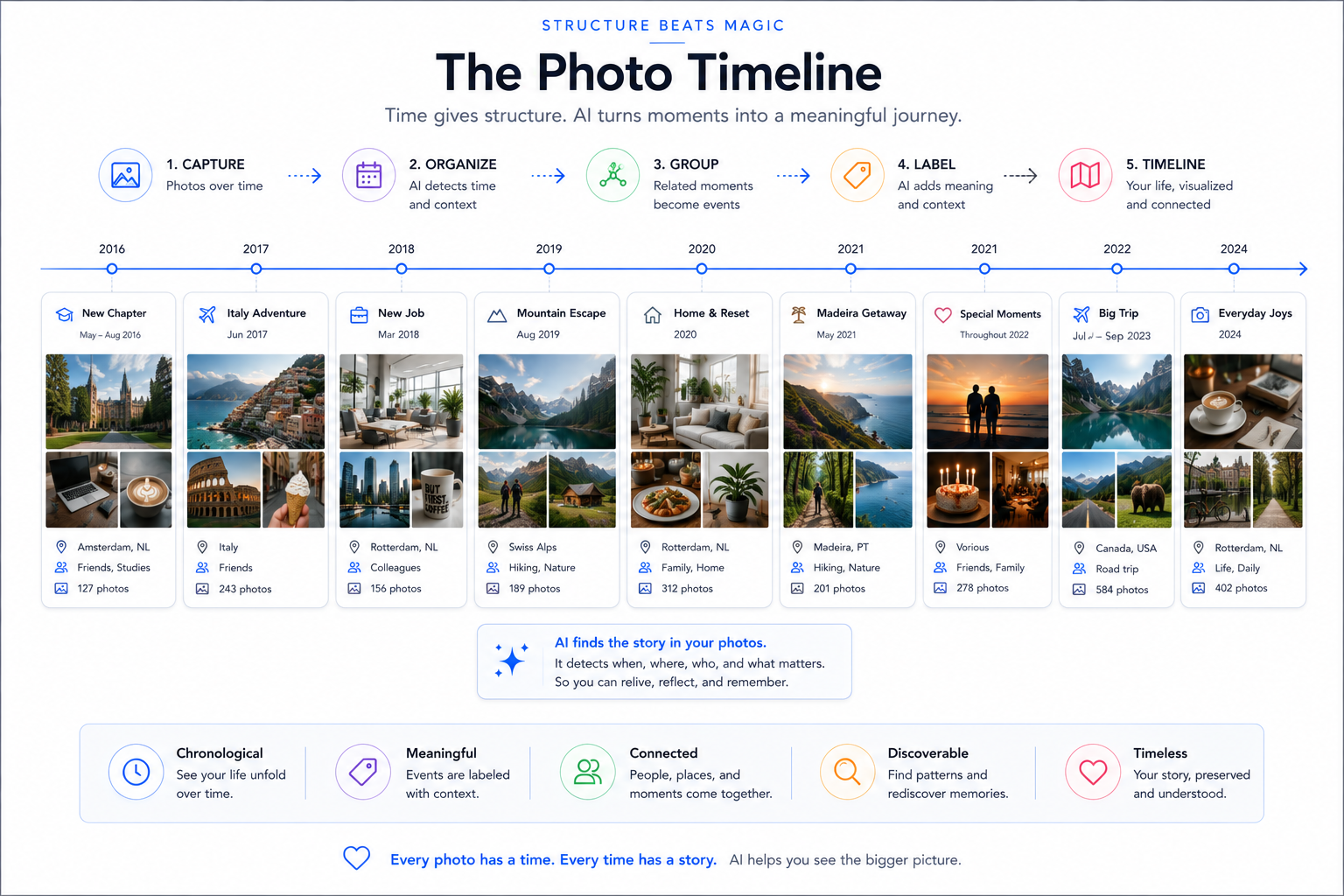
The photo timeline — time gives structure, turning moments into a meaningful journey
Time gives structure. With the calendar as the spine, scattered moments become a meaningful, navigable timeline — chronological, labelled, connected.
Runbooks

How-to, written once

A runbook captures a repeatable procedure — "how I process the inbox", "how I refresh the backups" — so a task is done the same way every time, by you or by an AI following the steps. Knowledge that would otherwise live only in your head.

Decision records

Why, not just what

Big choices get written down — with the options and the reasoning — so future-you (and the system) knows why. Not bureaucracy: a memory of judgement.

ADR

Architecture decisions

PDR

Personal / life decisions

IDR

Investment / purchase decisions

BDR

Business decisions

Agreements ↔ transactions

Track what you agreed — and check it actually happened

An agreement (a subscription, a contract, a recurring payment) is a promise about the future. Link it to the transactions it should produce, and the system can do something powerful: verify reality against the agreement. Was I charged the agreed amount? Did a cancelled service really stop billing? Is a payment missing? An agreement no one checks is just a hope; an agreement linked to transactions is governance.

How things get in

A small vocabulary of capture types

Most notes apps give you one bucket: "a note." But a fleeting idea, a decision, a task, and a reflection are different things that deserve different handling. So every capture has a type — and that one label is what makes the pile sortable, queryable, and promotable later. AI (or you) tags it at the moment of capture.

type-first naming → action_ikea-elvarli.md  ·  idea_travel-brand.md  ·  decision_skip-cert.md
Thinking
idea_a fleeting idea to develop later
question_an open question needing an answer
research_a deeper investigation
decision_a choice, with options + reasoning (→ IDR/PDR/BDR)
Doing
action_a concrete task with owner/deadline
briefing_preparation before an event
debrief_the outcome/lessons after an event
meeting-notes_notes from a call or consult
Knowing
memory_a fact/preference to persist for future AI sessions
learning_new knowledge from a source
reflection_a personal consideration
journal_free-form diary
Records
scan_a scanned paper document
transaction_a bank / bookkeeping entry
correspondence_a formal message in/out
itinerary_trip / travel detail

Why bother? Because a typed capture is data, not just text: you can pull "every open question_", "all decision_ records this year", "unresolved action_s" — instantly. The type is a tiny act of structure at capture time that pays off forever after.

Capture once, link out

It lands in the day — then connects to the subject

Every capture is saved in the day-folder first — because the moment it happened is the one fact you always know. But a task about your car or a decision about a trip also belongs to those subjects. So the capture stays in the day (its home), and a link is added from the relevant domain / subject folder to it. One file, two ways in: by time (the day it happened) and by topic (what it's about).

Over time the best captures get promoted — an idea_ becomes a plan, a decision_ becomes a formal record, a memory_ graduates to the AI's long-term memory. The day-folder is the inbox; the domains are where things mature. Capture fast and dated; organise by linking, not by moving.

For mere mortals

Why metadata matters — even for a personal system

"Metadata" sounds like enterprise jargon. It just means the facts about a thing — when a photo was taken, where, by which camera; who a note is about; what a document is for. You don't need a data platform to benefit. The moment your own stuff carries a little structured data, it stops being a pile and becomes searchable, sortable, answerable.

Without metadata

A drawer of stuff

Folders of files you can only find by remembering where you put them. "Where's that receipt? Which photos were from Sicily? What did I decide last spring?" — a manual hunt, every time.

With metadata

A thing you can ask

The same files, each tagged with a few facts, become a database you query: "all photos in Palermo," "agreements over €10/month," "everything about this person." The computer does the hunting.

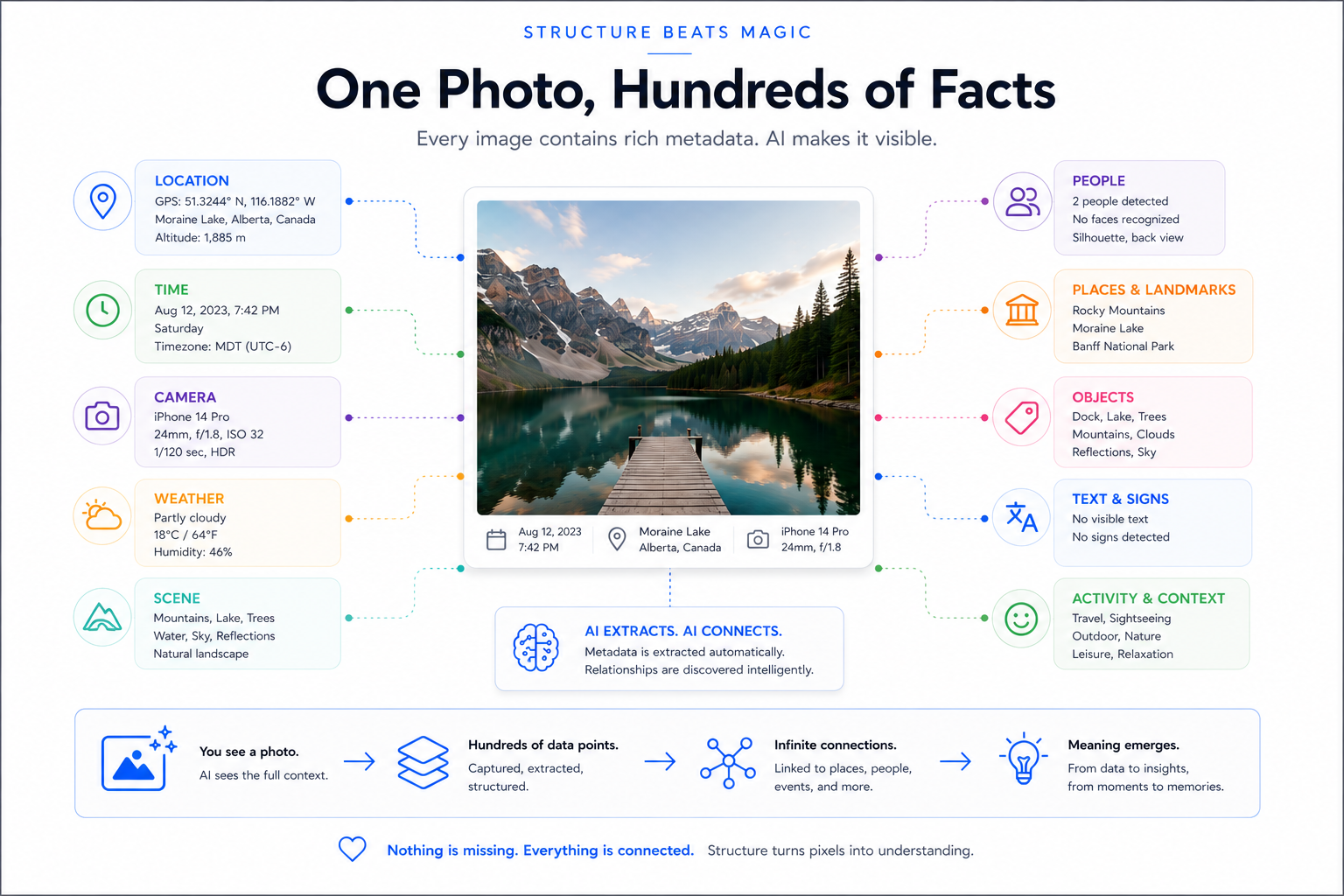
One photo, hundreds of facts — location, time, camera, weather, people, places, objects
One photo, hundreds of facts: location, time, camera, weather, people, places, objects, even text. The same is true of your notes, documents and transactions — structure is mostly just choosing to read it.
DAM — Digital Asset Management

Your media, given the same structure as your notes

Photos and videos are usually the least organised thing people own — thousands of files, no structure, impossible to search. A DAM fixes that: it catalogues your media with metadata (date, place, tags, people) so the collection becomes queryable, just like the vault. And critically, it links to the brain: a photo's location lines up with a trip in your notes; a scanned document attaches to the day it happened; an image becomes evidence behind a recommendation. The DAM is where your media stops being a separate silo and joins the one connected system — the same metadata discipline, applied to pictures instead of words.

Seeing it

Reading the vault with Obsidian

A pile of markdown files becomes a navigable knowledge base in Obsidian — links between notes, a graph of how everything connects, and live views built from the data itself. The same plain files an AI reads, you read as a connected web.

Frontmatter

Structured data on every note

A small block at the top of each file turns prose into data: typed fields the system can filter, sort and validate. This is what makes a note queryable instead of just readable.

---
type: agreement
vendor: Hetzner
amount_eur: 4.20
cycle: monthly
status: active
tags: [backup, eu, infra]
---
Dataview

Live views, not manual lists

Instead of hand-maintaining a table, you query the frontmatter — and the view stays current as the notes change. A list of active agreements, this month's transactions, every unresolved action: generated, never stale.

```dataview
TABLE vendor, amount_eur, cycle
FROM #agreement
WHERE status = "active"
SORT amount_eur DESC
```

Frontmatter makes notes data; Dataview makes that data visible; the AI layer makes it actionable. Three views of the same structured files — for the eye, for the query, and for the assistant.

Plugins that earn their place
Folder Notes

Each folder gets an index note named after itself — so a folder is also a page, not just a container.

Dataview

Live tables & lists queried from frontmatter across the whole vault.

Bases

Grid views that query structured notes across every domain — a database feel over plain files.

Templates

Consistent structure for recurring note kinds — daily notes, decisions, captures.

The principle behind every plugin choice: it must add structure or visibility, never just decoration. Plain files stay the source of truth; plugins are how you see and steer them.

Links — the connective tissue

Notes that point to each other

Every [[wikilink]] between notes is a deliberate connection — this venue relates to that trip, this person to that project. Over time the links matter more than the notes: they encode how things relate, which is exactly the knowledge that usually lives only in your head.

# in a trip note
Dinner at [[Don Camillo]] with [[Annemarie]],
booked via [[Ortigia 2022]] — see [[hotel-quality]].
The graph & AI

Links are a knowledge graph the AI can walk

Obsidian draws those links as a graph — a map of your whole knowledge. The same links are gold for AI: when Claude Code works in the vault, a wikilink tells it exactly which related note to open next. It doesn't have to guess what's relevant — you've already drawn the path. Structured links turn a folder of files into a traversable graph for both human and machine.

A graph is just structure made visible — and structure is what lets an AI navigate your knowledge instead of hallucinating around it. Every link you make is a hint you leave for your future assistant.

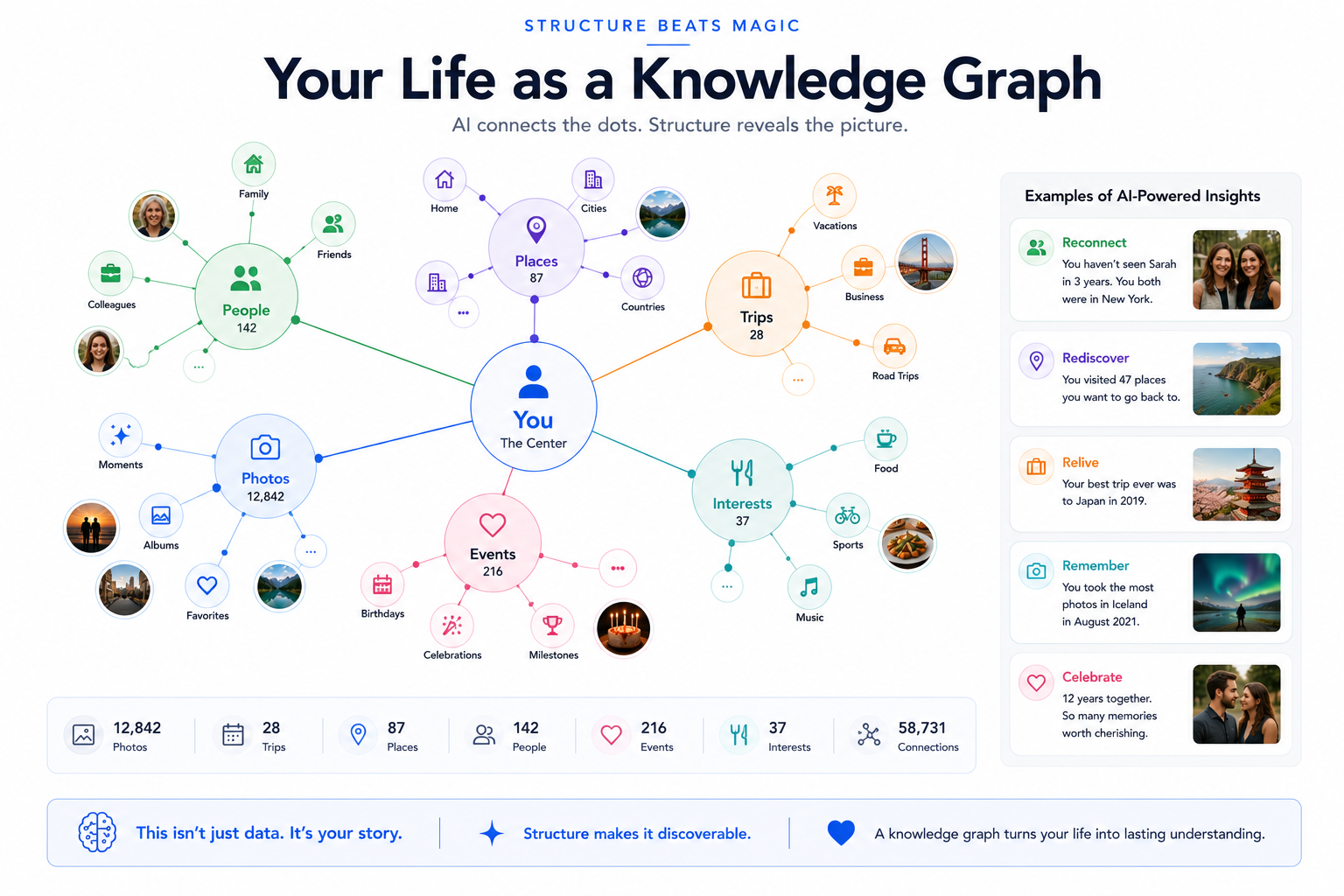
Your life as a knowledge graph — people, places, trips, events connected to you, with AI-powered insights
Your life as a knowledge graph: every node connected to you — and once it's structured, the AI surfaces real insights ("you visited 47 places you want to go back to"). This isn't data; it's your story, made discoverable.
The working environment

Plain files, versioned, reachable anywhere

The whole system rests on a deceptively simple choice: store everything as markdown. From there, version it like code, and reach it from every device through one AI layer.

The format

Markdown as the universal store

Every document — notes, decisions, agreements, briefings — is plain markdown. Human-readable, future-proof, owned by you, and perfectly legible to AI. No proprietary format, no lock-in, no app that can hold your words hostage. Plain text outlives every tool.

The history

Git — track every change (carefully)

Because it's plain text, the vault can be versioned with git — every edit a tracked change you can diff, review or roll back. But a personal vault is not public code: it holds deeply private data, so where the repo lives matters. A plain git remote isn't encrypted — keep it private/self-hosted, or skip a remote entirely and rely on the encrypted backup instead. Versioning and protection are two different jobs.

The intelligence

Claude Code in VS Code

My day-to-day cockpit: an AI agent working inside the files in VS Code — reading the vault, following links, editing notes, running the pipelines. Not a chat beside your work; an assistant within it.

The decisive principle

The markdown is the foundation. The AI tools are interchangeable.

This is the whole bet. Because everything is plain markdown, no single AI tool owns your system. Models change monthly; today's best is next year's also-ran. When your data is structured and portable, you simply point a different — or better — tool at the same files. You can even run several in parallel, each on what it does best, against one source of truth. Own the structure; rent the intelligence.

Foundation = yours · AI tools = swappable
Tools I reach for (and freely swap)
Claude Code ⭐

My primary — agentic work inside the vault & repos. Reads files, runs pipelines, edits in place.

ChatGPT

Strong for image generation and quick second opinions.

Cursor

AI-native editor — another lens on the same files when it fits.

Perplexity

Fast, sourced research and fact-finding on the open web.

Different strengths, one foundation. The point isn't loyalty to a tool — it's that the structured markdown underneath lets you use the right one for each job, today and whatever comes next.

Reachable anywhere — connect & dispatch

One brain, many doors

The core lives on a master machine, but you're not chained to a desk. Capture from your phone; think and plan in Claude Desktop, Cowork and Projects; run the heavy work through Claude Code. The pattern is connect and dispatch: a quick idea or instruction from anywhere is routed to where the real processing happens, against the same single source of truth.

📱 Phone capture 💬 Claude Desktop · Cowork · Projects 🧠 The vault (one source of truth) ⚙️ Claude Code · VS Code

Capture anywhere, dispatch to where the power is, commit back to the one vault. The devices are just doors — the structured, versioned markdown behind them is the thing that's actually yours.

The quality layer

Trust comes from checking, not hoping

AI generates; it also gets things wrong. The difference between a toy and a system is that a system validates its own output — continuously — and keeps improving. This is the discipline most "AI productivity" never mentions.

1 · Generate

AI produces

Drafts, enrichments, classifications, recommendations — fast and at scale.

2 · Validate

Check against known context

Plausibility checks: was I really there then? Do I know this vendor? Is this date possible? Cross-check every datapoint against what's already true.

3 · Flag, don't guess

Surface the doubt

On a mismatch, the system flags it for review instead of confidently inventing — catching OCR errors, mis-dated scans, misclassifications.

4 · Improve

Refine the rules

Review the auto-generated results, fix what's wrong, and improve the rules themselves. The system gets more trustworthy over time.

It's a double loop: rules check the output, and the checks themselves get reviewed and improved. Borrowed straight from data-quality engineering — and the reason the output stays reliable as the system grows. You must check the auto-generated results. Continuously.

The honest cost

You have to train it — and that takes real input

This is the part the hype skips. An assistant that knows you doesn't arrive ready-made; you train it. That means feeding it a lot of input — your context, your preferences, your history — so there's enough data and enough rules to reason over. It means correcting the AI when it gets things wrong, and then doing the crucial bit: capturing that correction as an improved rule or skill, so the same mistake doesn't return. Over time the system gets sharper — but only because you kept investing. There's no version of this where you put in nothing and get an assistant that truly knows you. Discipline is the price; compounding capability is the payoff.

Lowering the cost of input

If input is the price, make input cheap

Training the system takes a lot of input — so the friction of getting it in matters enormously. Typing is the slow path. The trick is to capture by the fastest means available and let the structure absorb it.

Voice → text

Speak, don't type

Most thinking is faster spoken than typed. Dictate a reflection, a draft, a correction — on the phone, on a walk, on a watch — and let it land as text in the vault. The single biggest reduction in input friction.

Self-built, local

My own transcription — not just off-the-shelf

Beyond standard tools like Wispr Flow, I run my own transcription in the vault: local speech-to-text (faster-whisper) that turns voice memos into markdown on my own machine — private, no per-seat cost, and wired straight into the daily note. The capture tool is itself a building block I control.

Capture anywhere

Many doors, one inbox

Voice, quick text, photos, even email-to-agent — whatever's nearest in the moment. All of it flows through the controlled inbound into the same structured core, so capturing is effortless and filing is automatic.

Freedom at the input, discipline in the structure. The easier it is to feed the system, the more it knows — and the smarter the assistant gets.

Capturing the intangibles

Your voice, your no-list, your lessons — as files

The hardest things to get from AI — sounding like you, avoiding your pet hates, not repeating yesterday's mistake — aren't prompting tricks. They're files. Once captured, they apply every time, automatically.

Voice as a skill

It writes like you, on demand

Feed it real samples of how you actually write, distil them into voice rules, and bake that into a triggerable skill. Your voice stops being something you re-explain and becomes reusable structure.

The anti-style file

What you'll never write

The negative space of voice: banned words, clichés, the "this isn't X, it's Y" tics that scream AI. Telling the system what to avoid removes the tell more reliably than telling it what to do — the same anti-interest principle, applied to writing.

The mistakes file

Corrections that actually stick

Every time you correct the AI, write it to a mistakes file the system reads at the start of each session. That's the enforcement behind "capture corrections as rules" — the mechanism that makes the system compound instead of repeating the same error tomorrow.

Voice, anti-style, mistakes — three files that turn the most human, hardest-to-pin-down parts of working with AI into durable structure. Write it once; it applies forever.

What it actually runs

Applications, already in the vault

Not a roadmap — what's running today. Dozens of small, connected applications on one foundation, each turning a source into something useful.

Daily-note enrichment

Auto-fills each day from 20+ data sources.

Cascade roll-ups

Day → week → month → quarter → year, generated.

Photo / DAM pipeline

EXIF + sidecars → geo-indexed, tagged library.

Location intelligence

Timeline → "at work / at the gym / on a trip" via rules.

Finance importers

Transactions structured, classified, validated.

Health pipeline

Steps, sleep, workouts from the phone, folded in.

Scan routing

Receipts/docs OCR'd and filed to the right day.

Trip intelligence

Trips derived from your own data — beyond TripIt.

CRM / relationships

People & interactions as structured context.

Reading highlights

Readwise → a queryable idea corpus.

Travel curation

Taste-scored venues, first-party photos, a live site.

AI movie library

Recommends from taste + films seen.

Task validation + publish

Checked tasks synced out to calendar.

Publishing engine

Vault → sites & documents, portable.

The non-negotiable

It's your data. Keep it that way.

Every block here is chosen to be independent — not locked to a big-tech vendor who changes the API, the price, or the rules without asking. The deliberate direction: step by step, reduce dependence on Google Drive, Google Photos and OneDrive, and move to building blocks you control. Convenience today isn't worth losing your own data tomorrow.

Independent building blocks > vendor lock-in
The engine

Enterprise-grade data tools, for the rest of us

The same class of technology that powers large data platforms now runs on a laptop — for almost nothing. This is what makes governed, powerful systems possible beyond the enterprise.

DuckDB
In-process analytics

A complete analytical database in a single file. Query gigabytes of your own data — photos, books, mail, finances — instantly, locally, free.

MotherDuck
DuckDB in the cloud

The same engine, scaled to the cloud and shared — so a personal system can grow into a team one without changing how it's built.

DuckLake
Lakehouse, simplified

An open table format that brings warehouse-grade structure (versioning, large data) without warehouse-grade complexity or cost.

MotherDuck Flight Plans
AI-built pipelines

Describe a pipeline in plain language and let AI assemble it — ingest, sync, alert — no plumbing code. Structure + AI + rules, made practical.

The point isn't the tools — it's that the gap between "enterprise data platform" and "what one person can run" has collapsed. Structure is now affordable for everyone willing to build it.

The surfaces

Everyday tools, wired into one system

You already use the right tools — calendar, drive, CRM, photo and book libraries. The leverage comes from making them talk: each is a source or a surface feeding one connected brain, instead of a silo.

Sources — capture
  • Google Calendar — time & events
  • Google Drive — documents
  • Cloze — relationships & CRM
  • Photo / DAM (Immich, digiKam, Eagle, ExifTool)
  • Calibre — your e-book library
  • Readwise, mail, finances
Integration — the brain
  • One structured store (DuckDB)
  • Cleaned, linked, validated by rules
  • Interests & anti-interests as filters
  • Queryable across every source at once
Delivery — surfaces
  • An AI assistant that actually knows you
  • Daily notes & briefings, enriched
  • Published sites & documents
  • Decisions grounded in your real history

A calendar entry, a photo's location, a CRM contact and a book highlight stop being four separate apps — and become one fact the system can reason over.

Across boundaries

Exchange: how data comes in, and how you share it out

A private system still has to meet the world. The trick is a clean, deliberate boundary — a controlled inbound for what comes in, and a publication layer for what goes out — so your private core stays private and only what you choose is shared.

Inbound — ingest

A controlled front door

Everything enters through a known landing zone, not straight into the core:

  • Phone captures, scans, exports, photos
  • Validated & routed before it's trusted
  • One place to watch, clean, and onboard new data
Outbound — the publication layer

Share on purpose, not by accident

A separate, generated layer for what leaves the core — read-only, portable, opt-in:

  • Sites & documents published from the brain
  • Per-item visibility — private by default, shared by choice
  • A read-only copy, so the source is never exposed
Shared activities

Traveling together, sharing what matters — and nothing more

Two people on the same trip don't need to merge their whole lives — just the slice that's shared. The publication layer makes that natural: export exactly the trip, the itinerary, the photos you both want — to a travel companion, a partner, a family member — while the rest of each person's system stays entirely their own. Selective sharing, not a shared account.

A concept worth naming

Curated Sources

Not all inputs are equal. A Curated Source is a person, publication or collection you've deliberately judged worth trusting — scored for relevance and quality — and fed to the system as a filter. The opposite of drinking from the firehose: a chosen, structured layer of inputs the AI can lean on.

📚 Books & publications

What you read, your favourite authors and publishers — your taste, made explicit.

✍️ People you trust

Writers, critics, experts — scored by how much their judgement is worth to you.

🧳 Your own shelf

Scan the contents of your travel books; the destinations and authors become curated input.

🌍 Favourite bloggers

Share the travel bloggers you rate — their picks feed the curation engine.

Because you chose them, they're a signal of your taste — exactly what an AI needs to recommend like you would. Curated Sources turn "what I trust" into structured input. Generic AI averages the internet; this points it at the few sources that actually match you.

Separating data from self

Personas — one engine, many selves

An architectural idea that falls out naturally once structure is clean: separate the data from the preferences, rules and history. The vault engine stays the same; the persona loaded on top is swappable.

The engine — shared

  • Structure & folders
  • Pipelines & rules-engine
  • AI layer & skills
  • Validation & quality checks

The persona — swappable

  • Identity: age, situation, stage of life
  • Interests and anti-interests (scope)
  • Personal history & data
  • Rule-sets imported by attributes (children Y/N, senior, …)

Copy the vault, load a different persona — different interests, history, anti-preferences — and the same machine reasons as a different person. You can build the architecture once and serve many people, import sensible starter rule-sets for a life-stage, or simply see the world through another lens. The cleanest proof that data and judgement are separate things. (A direction I'm designing — vision, not yet built.)

The foundation

Building blocks: where your data lives, and who controls it

A powerful personal system is worthless if you don't own and protect what's in it. Sovereignty, privacy, and backup aren't an afterthought — they're the foundation everything else sits on. The governance discipline, applied to your own life.

Jurisdiction

EU, not US, by choice

Where data lives is a legal decision, not just a technical one. I keep mine with a long-established German provider, under EU jurisdiction and GDPR — not on US infrastructure by default.

🇪🇺 EU-hosted
Encryption

Encrypted by sensitivity

Match the lock to the value. Sensitive data is client-side encrypted before it ever leaves the machine; low-sensitivity bulk goes encrypted-at-rest. Encrypt deliberately, not blindly.

Backup

Off-site, encrypted, automatic

Versioned, deduplicated, client-side-encrypted backups to EU object storage — so a lost laptop is an inconvenience, never a catastrophe.

Cold copy

A spare drive you carry

Cloud isn't enough. An encrypted physical copy on spare SSDs, kept with you, means you're never one outage — or one account lockout — away from your own data.

Sync

Your phone, aligned — no middleman

Phone and laptop stay in sync directly, device-to-device, without handing the data to a cloud you don't control. Captured on the go, present everywhere.

Control

You hold the keys

The point of every block above: you — not a vendor — own the data, the encryption keys, and the ability to keep it that way. That's sovereignty.

Each is a building block. Stack them and you get something rare: a powerful, AI-ready personal system you actually own — private, portable, and resilient by design.

Personal productivity, by domain

One method, every corner of life

The same structure-first approach turns each area of life from a pile of stuff into a system that knows your taste — and your favourites.

Travel

Trips reconstructed from photo GPS; recommendations filtered to your taste, not the tourist trail.

Favourites that fit you

Photos

155,000 images turned into a searchable, geo-indexed map of where you've been.

Your whole life, queryable

Finance

Transactions structured and validated — spending you can actually see and reason about.

Clarity, not spreadsheets

Movie library

AI that recommends films from your taste and what you've already seen — not generic "popular now".

Worth your evening

Favourites

Across every area — your interests and anti-interests captured, so the system always knows what's truly you.

A modeled taste