The one-time-export trap
Buried three or four menus deep in every wearable and health app is a button that says something like Download your data. It's there because regulation made it be there, and it works: press it and you get a zip of fifty to a hundred files with everything the app knows about you. It is, in principle, the escape hatch from the vendor's walled garden.
In practice, almost nobody uses it more than once. You press it, a zip lands in your Downloads, you save it somewhere, and then… nothing. Six months later that export is stale, half its contents are data you no longer care about, and the thought of doing the whole menu-diving, unzip, figure-out-the-format dance again is enough that you don't. The export button gives you your data exactly once and then bets — correctly — that you'll never make the effort to keep it current.
The reason isn't laziness. It's that the export is a one-time act and using the data is an unclear ongoing workflow, and a one-time act pointed at an unclear workflow decays to zero. The fix isn't discipline. It's turning the workflow into a pipeline — so that pressing the button becomes a five-tap habit whose payoff is automatic and visible.
The architecture: four hops, two of them automated
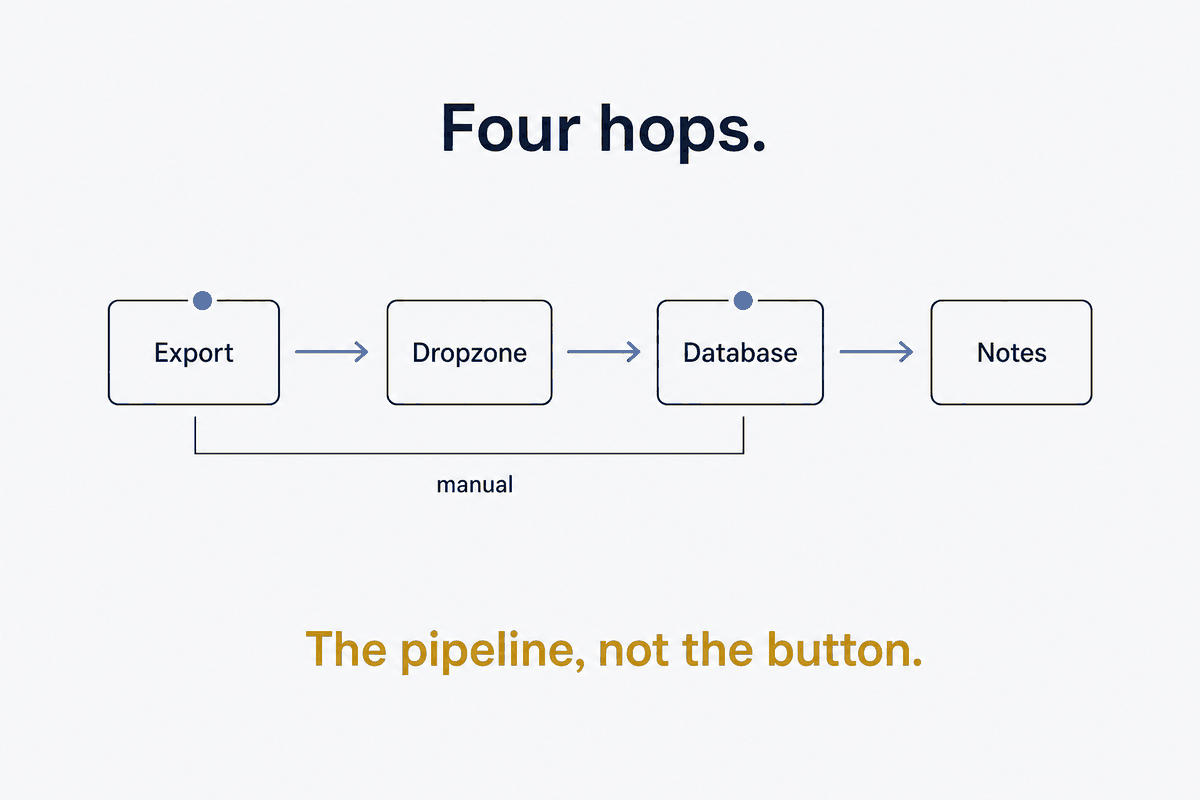
Here's the shape that makes the export sustainable. It's four hops, and the trick is that only two of them are manual — and the manual two are cheap.
Phone: press "export"  →  saves to /Download/<vendor>/
   ↓  (Syncthing, automatic)
Laptop: drop-zone folder
   ↓  (routing script, one command)
DuckDB: per-vendor schema
   ↓  (daily-note enrichment, automatic)
Daily-note sections: ## Workouts, ## Health metrics, ...
Hop one is pressing export on the phone — manual, five taps, unavoidable, because the vendor gives no API. Hop two is transport, and it's automatic: a sync tool watches the phone's download folder and mirrors new exports to a dropzone on the laptop, with no cloud in the middle. Hop three is one command — run the routing script — which imports the export into a local database. Hop four is automatic again: the daily-note enrichment reads the freshly-imported data and drops it into each day's note.
Two manual touches (press export, run the script), two automated legs (sync, enrich). The whole difference between "a button I press once a year" and "a habit I keep" is that the pipeline removes every step between pressing export and seeing the data show up where I'll actually read it. (What the notes do with the data — the schema, the views, the cross-source joins — is the health-metrics spoke; this piece is about getting it there safely.)
Syncthing as the transport, and why not the cloud
The transport leg is peer-to-peer sync rather than a cloud drive, and the choice is deliberate: your complete health export is exactly the kind of data you don't want sitting on someone else's server just to move it between two of your own devices. Syncthing does this gluing — direct device-to-device, encrypted in transit, no third party — and the one configuration detail that matters here is folder-type. This particular flow wants both sides able to delete, because the pipeline's cleanup step (below) needs the deletion to propagate back to the phone. And a .stignore keeps the OS junk and soft-deleted files out of the transfer, so the dropzone only ever sees real exports.
The drop-zone: a staging area that's empty by design
The exports do not sync straight into your canonical data folders, and that restraint is the whole safety story.
A drop-zone is a temporary staging area — a folder that is empty by design, whose only job is to catch inbound exports and hold them until the routing script processes them. The reason not to sync directly into canonical storage is blunt: a mirrored folder can propagate deletes and overwrites, and you never want the sync layer able to reach into your structured, permanent data and modify it because a phone did something weird. The dropzone is a quarantine. Data lands there, gets inspected and imported deliberately, and only then — through code you control, not through the sync protocol — reaches anything permanent. A folder-note in the dropzone documents the flow, so future-you (or an AI) knows what this staging area is for.
The routing script: the brain, and where the safety lives
The routing script is the one command you run, and it's built around a single principle: do the dangerous things only on the success path.
Its sequence:
1. Detect new exports in the dropzone by name-pattern. 2. Move them to a dated canonical folder — using a copy-then-verify, not a bare move, so a half-transferred file can't corrupt the archive. 3. Import via a vendor-specific parser into DuckDB. 4. Smoke-test: did rows actually land? Query the table; confirm the import produced data, not an empty success. 5. Only on success, enrich the daily-notes and apply the retention policy. 6. Only on success, clean up the dropzone — which propagates the delete back to the phone, freeing its storage.
The ordering is the safety. Deletes and cleanups come last, gated behind a smoke-test that proves the import worked. If anything fails — a corrupt export, a format the parser doesn't recognize, zero rows imported — the script stops and leaves the dropzone intact for manual inspection. Nothing is deleted, nothing is cleaned up, the evidence is preserved exactly where it landed. And the whole thing is idempotent: re-running it is always safe, because it detects what's already been processed and only acts on what's new. Safety here isn't the absence of failure — failures will happen, vendors will ship broken exports. Safety is that failure leaves everything recoverable and success is the only thing that triggers a delete.
Retention: the database is the history, the exports are just evidence
Once data is imported, the raw export has done its job — the history now lives in DuckDB, and the export file is merely the evidence that an import happened. So retention can be aggressive without losing anything:
- Keep the last couple of exports in the canonical folder (for a quick re-import if you ever need one).
- Move older exports to an archive folder.
- Delete archived exports past thirty days — the data they carried is already in the database, permanently.
This keeps import-evidence around long enough to debug a bad import, without letting years of redundant hundred-file zips pile up. The rule that makes it safe to be this aggressive: the database is the canonical history; the exports are import-evidence, not the record. Confuse those two and you hoard exports forever out of fear; separate them and retention becomes obvious.
The vendor-quirk reality
An honest word about the parsers, because this is where the pipeline meets the real world's mess. Every vendor exports differently and inconsistently. One health platform changed its CSV export format mid-year and sometimes ships JSON instead of CSV for the same data — so the parser has to tolerate both. Another exports only XML, never CSV, and parsing it is its own small project. A third takes days to fulfill a full export request. So you write one importer per vendor — each absorbing that vendor's specific weirdness — but the routing, the smoke-test, the retention, and the enrichment are shared infrastructure used by all of them. The vendor-specific ugliness is quarantined in the parser; everything downstream is uniform. That separation is what keeps the pipeline maintainable as vendors churn their formats underneath you.
What this isn't
Briefly, the boundaries, because an infra piece should draw them. This is not real-time — export cadence is measured in weeks, and that's fine; the point is a durable record, not a live feed. It's not medical — it's a reflection and memory system, not diagnosis. And it's not a vendor replacement — the vendor's own app stays for live coaching and glanceable today-numbers. The pipeline isn't trying to replace the app; it's trying to free the data the app is sitting on, and route it somewhere the app was never going to take it: into the notes you actually re-read.
The button was never the opportunity — the pipeline is
The "Download your data" button feels like the escape hatch, but on its own it's a dead end: a one-time export pointed at a workflow you'll never repeat. The opportunity was never the button. It's the pipeline that stands behind it — dropzone, routing-script, smoke-test, retention, delete-on-success — that turns a once-a-year chore into a five-tap habit whose results show up where you'll see them.
This is structure beats magic at the plumbing layer of a personal system. The magic answer is a vendor that finally gives you a good API and a lovely dashboard (they won't). The structural answer owns the transport yourself: a staging dropzone so the sync layer can never touch your canonical data, a routing script that does the dangerous work only after a smoke-test passes, and a retention rule that trusts the database as the history. Build that once, and your data stops being trapped behind a button you'll never press twice.
Part of the Structure Beats Magic series — the transport spoke under Data-Driven Daily Notes. The sync leg is Syncthing as the Glue; what the notes do with the landed data — schema, views, cross-source joins — is Health Metrics in a Local DuckDB.