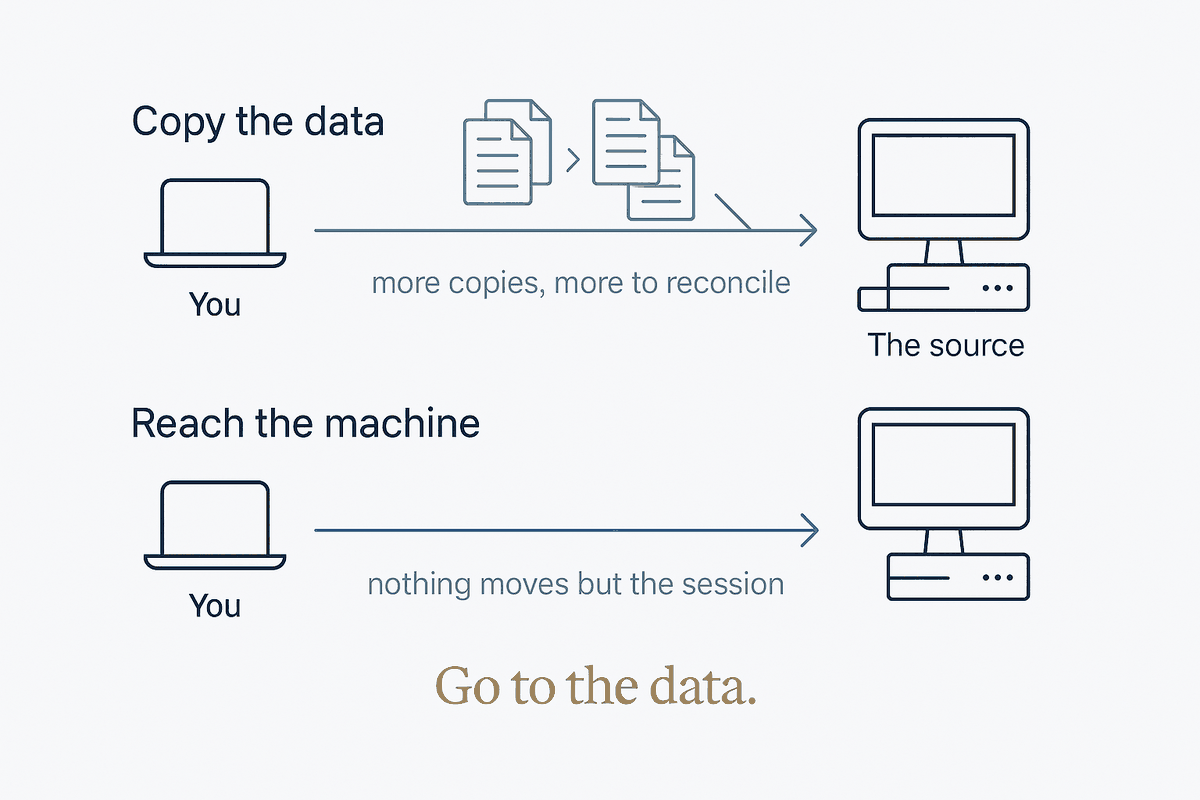
The question everyone asks, and the one they skip
Set up a second machine and the question arrives immediately: how do I get my stuff onto it?
It's the natural question and it has good answers — mirror the folders, restore from backup, generate a filtered subset. I've written about all three. But it quietly assumes something: that working elsewhere means having the data elsewhere.
There's a second question, asked far less often, that dissolves a whole category of problems.
What if the data stays exactly where it is, and I go to it instead?
Not a copy. Not a sync. A session on the machine that already holds everything — the vault, the databases, the repositories, the credentials, every local integration that took months to wire together.
Both answers are correct. They solve different problems, and knowing which one you're facing is most of the work.
Why a copy is sometimes the wrong shape
My second machine holds a read-only replica of the vault. That's deliberate, and for reading it's ideal — it works when the master is asleep, when there's no network, when I'm somewhere with bad signal.
But a replica has a hard ceiling: it's a copy, so it can't be the source.
Anything that must happen at the source — a script that writes into the vault, a database query against the live file, a tool wired to credentials that live on one machine — cannot happen on a replica. You can copy the files. You cannot copy the context: the environment variables, the API keys, the mounted drives, the integrations, the accumulated configuration that makes one machine yours.
That's the tell. When what you need is the machine rather than the files, stop trying to move the files.
The obvious solution, and why it's wrong
Remote access to a machine at home has a textbook answer: forward a port on the router, connect from outside.
It works. It's also how you take a laptop holding your entire life — vault, backup credentials, code-signing keys, push rights to every repository — and expose a login service to the open internet, where it will be found and probed within hours. Not because anyone is after you. Because everything is scanned, constantly.
The trade is bad in a specific way: you gain occasional convenience and accept a permanent, always-on attack surface. And the risk isn't proportional to how often you use it — the port is open whether you connect or not.
The better shape: a private network, not an open door
The alternative is to build a small private network spanning only your own devices, and put the service inside that instead of on the public internet.
Mesh VPNs do this. Each device joins a network identified by your account and gets a stable private address. Devices find each other through a coordination service, then — this is the part that matters — connect directly to each other, negotiating through the network address translation that would normally block them.
The properties are what you'd want from a personal system:
Nothing is exposed publicly. No port forwarded, no router configuration, no public address. A scanner sweeping your home IP finds nothing, because there's nothing to find.
Addresses are stable. Devices get a fixed private address that doesn't change when your provider rotates your public IP. Anything pointing at it keeps working. That single property quietly solves a class of breakage that plagues self-hosted setups.
It's direct. On my own pair: 7 ms, connecting straight rather than through a relay. Fast enough that a remote session feels local.
The membership is the boundary. Not a password on a public door — a network only your devices belong to.
The default that would have undone all of it
Here's the part worth the price of admission, because it's exactly the kind of thing that makes a careful setup quietly insecure.
Installing the SSH server on Windows is one command. It installs the service, and it also creates and enables a firewall rule permitting inbound connections on port 22.
From any address. RemoteIP: Any.
Which means: install the server, start it, and your laptop now accepts SSH connections on every network it ever joins. Home, office, hotel, airport, café. The private network you carefully set up is irrelevant, because the service isn't restricted to it. You built a gated garden and left the side gate open.
The fix is two steps, and the order matters:
# 1. Disable the rule the installer created
Get-NetFirewallRule -Name *OpenSSH-Server* | Disable-NetFirewallRule

# 2. Replace it with one scoped to the private network only
New-NetFirewallRule -Name "sshd-tailscale-only" `
    -DisplayName "OpenSSH Server (Tailscale only)" `
    -Enabled True -Direction Inbound -Protocol TCP -Action Allow `
    -LocalPort 22 -RemoteAddress 100.64.0.0/10
That address range is the block mesh VPNs allocate from. Traffic from anywhere else never reaches the service.
Do this before starting the service, not after. Start it first and there's a window — minutes, maybe hours if you get distracted — where the broad rule is live and the service is listening. Windows of that kind are how systems get compromised: not through a decision, through an ordering.
Check the thing itself, not the thing that reports on it
After configuring, I checked. The output:
Old rule:  Enabled: No    RemoteIP: Any
New rule:  Enabled: Yes   RemoteIP: 100.64.0.0/10   LocalPort: 22
That's the evidence. Not "the commands ran without errors" — the actual state of the actual rules.
And one detail that will confuse you if you look, because it looks alarming:
TCP 0.0.0.0:22 LISTENINGThe service is listening on all interfaces, and it will keep doing that. You cannot meaningfully tell it otherwise. The listener isn't the boundary — the firewall is. The service listens everywhere; the firewall decides who reaches it. Once you see that, the design makes sense: one component does one job, and the restriction lives in the component built for restrictions.
This generalises past SSH. An installer's defaults are a claim about the common case, not a fact about your case. The common case for an SSH server is a server in a datacentre where broad access is the point. Your laptop is not that. Every default worth trusting is one you've checked against your own situation — and the ones that bite are never the settings you agonised over. They're the ones you didn't know had been made for you.
What it's actually for
With the network up and the service scoped, one command from the other machine reaches the master:
ssh me@my-laptopAnd from there, anything that needs to happen at the source happens at the source. Run the assistant against the live vault. Query the real database. Trigger a build with the real credentials. Nothing was copied. Nothing has to be reconciled afterwards.
Which completes a set. The three-tool split — mirror, backup, history — is about the data: is it the same everywhere, can I get it back, how did it become this. This is the fourth question, and it's about presence: can I be where the data is, without moving it?
The replica and the remote session don't compete. The replica works when the master is off, offline, unreachable. The remote session gives full power when the master is on. Two answers to two genuinely different situations, and having both is better than picking a favourite.
The general move is the one worth keeping: when moving the data gets complicated, check whether you should be moving yourself instead.
Part of the Structure Beats Magic series — the fourth leg of the personal-OS spoke, after Syncthing as the Glue, Restic + Hetzner, and Mirror, Backup, History.